Overview
Version 18.1 continues our investment in reducing the manual effort required to process financial documents.
On the parsing side, we've made targeted improvements that allow more documents to process automatically—particularly large financial statements and PDFs with formatting inconsistencies. Fewer parsing stops means less time spent in Upload Assistance.
When documents do require assistance, you'll find the familiar workflow refreshed with a modern interface and incremental usability improvements: streamlined navigation, better visual feedback, and small time-savers throughout. The tools work the same way, but with refinements informed by user feedback.
This release also includes several frequently requested enhancements:
- Processing date support for borrowing base rules—aligning calculations with how reviews are evaluated
- Enhanced borrowing base results reporting—clearer visibility into collateral margin and period-over-period change
- Automated exchange rate integration with Bank of Canada—eliminating manual rate updates
- Client Portal exchange rate visibility—so borrowers can see current rates without contacting you
- In-context debtor/vendor combining—fix duplicates directly from review pages without navigating away
- Insurance policy expiration monitoring—automated tracking and alerts for policy renewals
Upload Assistance Redesign
The Upload Assistance workflow has been refreshed with a modern interface and incremental improvements throughout. While the core workflow remains familiar, you'll find refinements that reduce friction: cleaner navigation, better visual feedback, and small time-savers on each step.
These changes focus on reducing friction in the most time-consuming parts of the workflow, especially when working with large or imperfect documents.
Usability Refinements
-
Layout Redesign
- Navigation: Simplified step selection shows where you are and what's completed at a glance. Switching between documents and steps requires fewer clicks.
- Reorganized Menu: Download the original document in a single click. Less common actions are grouped in the menu, keeping the interface uncluttered.
- Compact Messages: Validation messages and guidance are shorter and less intrusive, giving you more screen space to work with the document.
-
Streamlined Workflow
- One fewer step: The separate statement confirmation step has been eliminated—what previously required an extra click now happens automatically.
- Resume where you left off: When returning to a document in progress, you're taken directly to where you need to continue working.
-
Manual Column Identification
- Visual highlighting and repositioned controls make it clearer which columns will be affected.
- Granular control remains available for complex documents.
-
Select Worksheet
This step now more clearly distinguishes between selecting a worksheet and previewing its contents. The worksheet selector is easier to find, and the preview is presented as read-only context—reducing confusion about where changes can be made.
-
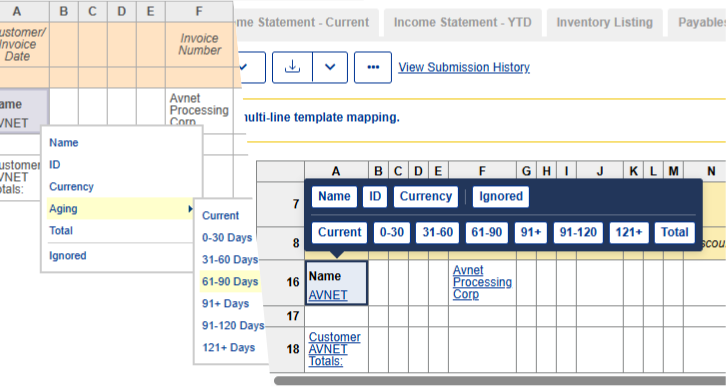
Listing Template Selection and Mapping
- Row Selection: The drag handle now spans the entire row, making it easier to grab. You can also click to select instead of dragging.
- Template List: Template options are always visible—no need to expand a collapsed panel.
- Navigation: Save changes without leaving the current template, making it easier to review and fix multiple templates in sequence.
-
Listing Select Totals
For multi-line listings, each row now shows the template it maps to—making it clear which template drives each result. A link lets you preview that template in a dialog, so you can investigate discrepancies without leaving Select Totals and only navigate to Map Templates if needed.
-
Statement Select Totals
Improvements focus on improved discrepancy feedback and faster resolution.
- Bulk Update: Select multiple lines and update them together, rather than one at a time.
- Discrepancy Indicators: Real-time counts and details make it easier to see what still needs attention.
- Column Headers: Source column headers are now displayed, helping you verify that values are mapped correctly.
- Unignore Rows: If you notice a row was incorrectly ignored in Select Headers, you can correct it here without navigating back.
-
Statement Spreading
Refreshed with collapsible category sections and improved preview generation.
-
Upload Error Page
Error messages have been rewritten for clarity, with clearer guidance on how to resolve common issues.
Parsing Improvements
Every document that parses correctly the first time is time saved for your team. Version 18.1 includes targeted improvements to handle more document variations automatically.
- Large Document Handling: Financial statements with 300+ line items previously required manual intervention due to mathematical complexity. These documents now use text-based structure identification, processing automatically in most cases.
- Complex income statements: Income statements with deeply nested sections are now more likely to complete automatically without manual review.
- Statement spreading: Statements using a wider range of financial terminology are now more likely to spread automatically.
- Better handling of imperfect PDFs: Many PDFs have slight formatting inconsistencies from scanning or conversion. We've improved tolerance for baseline variance (text not perfectly aligned), whitespace fragments overlapping numbers, and spaces within numeric values.
- Legacy Excel Formats: Added support for Excel 2003 SpreadsheetML, which previously had to be resaved and re-uploaded in a more modern format.
- Sparse Listings: Aged summary reports with many blank values now correctly identify total rows.
- Premature end-of-document detection: Listings that previously stopped reading data too early are now parsed more completely and reliably.
- Accounting System Support: Improved column identification for documents exported from NetSuite, BusinessVision, and Avantage.
- Currency Symbol Handling: Improved recognition of numeric values with trailing currency symbols separated by non-breaking spaces.
New Features
Borrowing Base Processing Date Support
Some borrowing base rules depend on dates—for example, when applying seasonal limits or time-bound logic. Historically, these rules were evaluated using the review period end date associated with the submitted documents.
Version 18.1 introduces optional processing date support for borrowing base rules, allowing date-based calculations to be evaluated as of the analysis date instead. This option must be explicitly enabled and is designed to better align results with how borrowing bases are reviewed and lending decisions are made.
At this time, processing date support applies to loan adjustments that add or remove amounts from the borrowing base for a defined period.
Administrators can enable this feature in Deployment Settings > Borrowing Base.
Enhanced Borrowing Base Results Reporting
Version 18.1 introduces optional enhancements to the Comprehensive Results borrowing base report, providing additional insight into collateral performance and changes over time.
A new Collateral Margin section highlights net eligible collateral after priority payables, offering greater visibility into the strength of the collateral base. In addition, the Borrowing Base Surplus/Deficit section can now display period-over-period change, making it easier to understand how results are trending between reviews.
These reporting enhancements are optional and can be enabled independently based on your reporting preferences.
Exchange Rate Integration
For institutions managing collateral in multiple currencies, accurate exchange rates are essential for borrowing base calculations. Maintaining rates manually is time-consuming and introduces risk of data entry errors.
Version 18.1 introduces automatic exchange rate updates from Bank of Canada, keeping your rates current without manual effort.
- Automatic updates: Rates are updated Monday through Friday at 6:00 PM ET—no action required
- On-demand refresh: Use "Run Now" when you need the latest rate immediately
- Reduced risk: Eliminate manual data entry errors that could affect borrowing base accuracy
Available for deployments with CAD as the base currency. Supported currencies are those available via Bank of Canada's Valet API.
Client Portal Exchange Rates
Your borrowers with foreign currency collateral often need to know what exchange rates will apply to their declarations. Previously, this meant phone calls or emails to your team.
Now, current exchange rates can be displayed on the Client Portal homepage. Borrowers can plan their declarations with full visibility into the rates that will be used—reducing inquiries to your team and improving self-service.
Administrators can enable this feature in Deployment Settings > Client Portal.
Debtor/Vendor Combine Enhancements
When reviewing a borrower's collateral, you may discover duplicate debtors or vendors that need to be combined. Previously, this required leaving the review, navigating to borrower administration, making the change, and returning—breaking your workflow.
Now you can combine debtors and vendors directly from the Classification and Debtor Insurance pages, staying in context and completing the task in seconds rather than minutes.
Insurance Policy Expiration Monitoring
Tracking insurance policy expiry dates across your portfolio can be challenging. Missing an expiration puts your institution at risk; tracking them manually in notes or spreadsheets is error-prone and easy to overlook.
Version 18.1 introduces automated insurance policy expiration monitoring:
- Simple tracking: Add an expiry date directly on the policy—no more burying critical dates in borrower notes
- Automatic alerts: When a policy expires, an issue is automatically created and added to your queue for action
- Self-resolving: When you update the expiry date or deactivate the policy, the issue closes automatically
The result: proactive compliance management with less manual tracking.
Other Improvements
Adding Machine
You can now edit Adding Machine history entries, not just view them. This frequently requested enhancement allows you to correct mistakes without clearing and re-entering all values.
This capability is available on both Borrowing Base Certificate and Ratio Input pages.
Upload Assistance
- Multi-row records: Multi-row records are now enabled by default, removing the need for separate configuration.
Ratio Input
- Visual Refresh: Ratio Input pages (View and Update) and the Financial Highlights Other Data section have been updated with a contemporary layout for consistency with other areas of the application.
- New Adding Machine: Ratio Input pages now use the redesigned Adding Machine introduced with the Borrowing Base Certificate, bringing improved usability to ratio workflows.
Account Management
For deployments that don't use multiple accounts, the account structure can now be hidden from the UI entirely. The required account is created automatically during borrower setup—eliminating a manual step that added time without value.
Administrators can enable this in Deployment Settings.
Release Notes Access
Release notes are now available directly from the Lender Dashboard. Select Help & Resources > Release Notes to view the current release notes and version history.
This replaces the previous PDF distribution via email.
Bug Fixes
Upload Assistance
- In some cases, non-financial values (such as phone numbers) were interpreted as amounts and caused totals to inflate dramatically, resulting in a system error. These cases are now detected and surfaced for review instead of failing unexpectedly.
- Documents with many rows could process successfully despite producing a zero total. These situations are now flagged for review to avoid silently passing incorrect results.
- Financial statements could remain in a “Pending Upload Assistance” state after Upload Assistance was completed.
- Memorized structures were incorrectly flagged as invalid when sign-flipping rules were applied.
- Navigation issues occurred when processing empty documents and financial statements with all zero values.
- Listing Select Totals lines remained disabled after being unignored in Map Templates.
- Listing Select Totals showed an inconsistency between the ignored row count and the rows displayed in the table.
- No error message was displayed when Select Headers validation failed.
- No error message was displayed when Select Headers validation failed.
Ratio Input
- An error could occur in Ratio Input when financial statements used differing currencies and only a subset of statements were received.
- Blank values were saved as zero instead of triggering required field validation.
- Required field validation did not trigger when some Ratio Input fields were left blank.
- Column alignment and accessibility issues occurred in the ratio input table.
- Currency rates were displayed in an inconsistent order.
- Cancelling out of the Receive Financials page did not return to the previous Ratio Input view.
Reports
- The Comprehensive Results report title was not applied correctly to child worksheet tabs.
Other
- Bulk data loads only matched values in the deployment’s default language and ignored configured secondary languages.
- Statement template items were displayed in an inconsistent order when updating from presets.